

Accept bank transfers
Updated 20 October 2026 · Owners turn it on; owners and managers mark orders paidShoppers can pay you by bank transfer: they see your bank details at checkout and send the money themselves. You mark the order paid when it arrives. It’s offered to stores in India and the United States.
Turn on bank transfer
- Go to Settings › Payment setup.
- In Other ways to get paid, press Set up next to Bank transfer.
- In Your bank details, type exactly what shoppers need to pay you. In India: account name, account number and IFSC. In the US: account name, routing number and account number.
- Press Turn on.
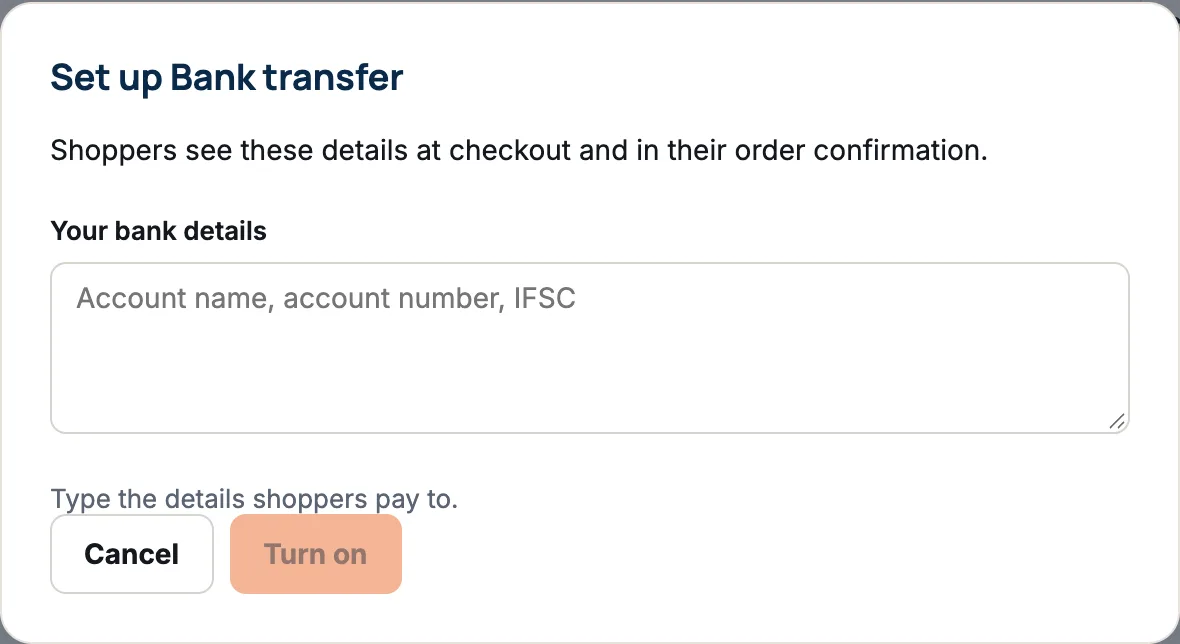
The row then shows Shoppers see: with your details. Use Change details to update them, or Turn off to stop offering it.
When a shopper pays by bank transfer
- The shopper sees your bank details at checkout and in their order confirmation, which says “We’ll send it once your bank transfer arrives.”
- The order arrives marked Payment pending.
- Check your bank account. When the money is there, open the order and press Mark as paid, then confirm.
- Ship the order. See Ship an order.
If the transfer doesn’t arrive within 3 days, the order is cancelled automatically and its items go back in stock. The order’s history shows “Transfer not paid in time”.
Finding transfers to check
- On Home, the payment to collect card counts orders waiting for cash or a transfer.
- In Orders, the Payment pending filter lists them.
Downloads and bank transfer
If the order is a download, the shopper only gets the download link once you mark it paid.
Questions
Can I ship before the transfer arrives?
Yes, the Ship items button works, but you take the risk that the money never comes. Most stores wait.
How should shoppers say which order a transfer is for?
Add a line to your bank details asking them to put the order number in the payment reference.
Who can mark an order paid?
Owners and managers. Staff see the button greyed out.