

Connect a payment method
Updated 20 October 2026 · OwnersConnect a payment provider so shoppers can pay by card, UPI, wallet or PayPal at checkout. The money goes straight to your own account with the provider. DripFunnel takes no fee on your orders.
Before you start
- Only the store owner can set up payments.
- You need your own account with the payment provider, opened and approved by them. Their fees are between you and them.
- Have the provider’s dashboard open in another tab: for most providers you copy keys from it.
Which providers you can use
The list depends on the country your store was set up in.
| Store country | Online payments | Other ways |
|---|---|---|
| India | Razorpay (cards, UPI, netbanking, wallets), Cashfree (cards, UPI, netbanking), PhonePe (UPI-first) | Cash on delivery, bank transfer |
| United States | Stripe (cards, Apple Pay, Google Pay), PayPal (PayPal balance, Pay Later) | Bank transfer |
| Other countries, including the UAE | None yet | None yet |
Stores outside India and the United States see No ways to get paid here yet. If that’s you, contact support before you plan your launch.
Open payment settings
Go to Settings and press the Payment setup tab. The Gateways card lists the online providers; Other ways to get paid lists cash on delivery and bank transfer.
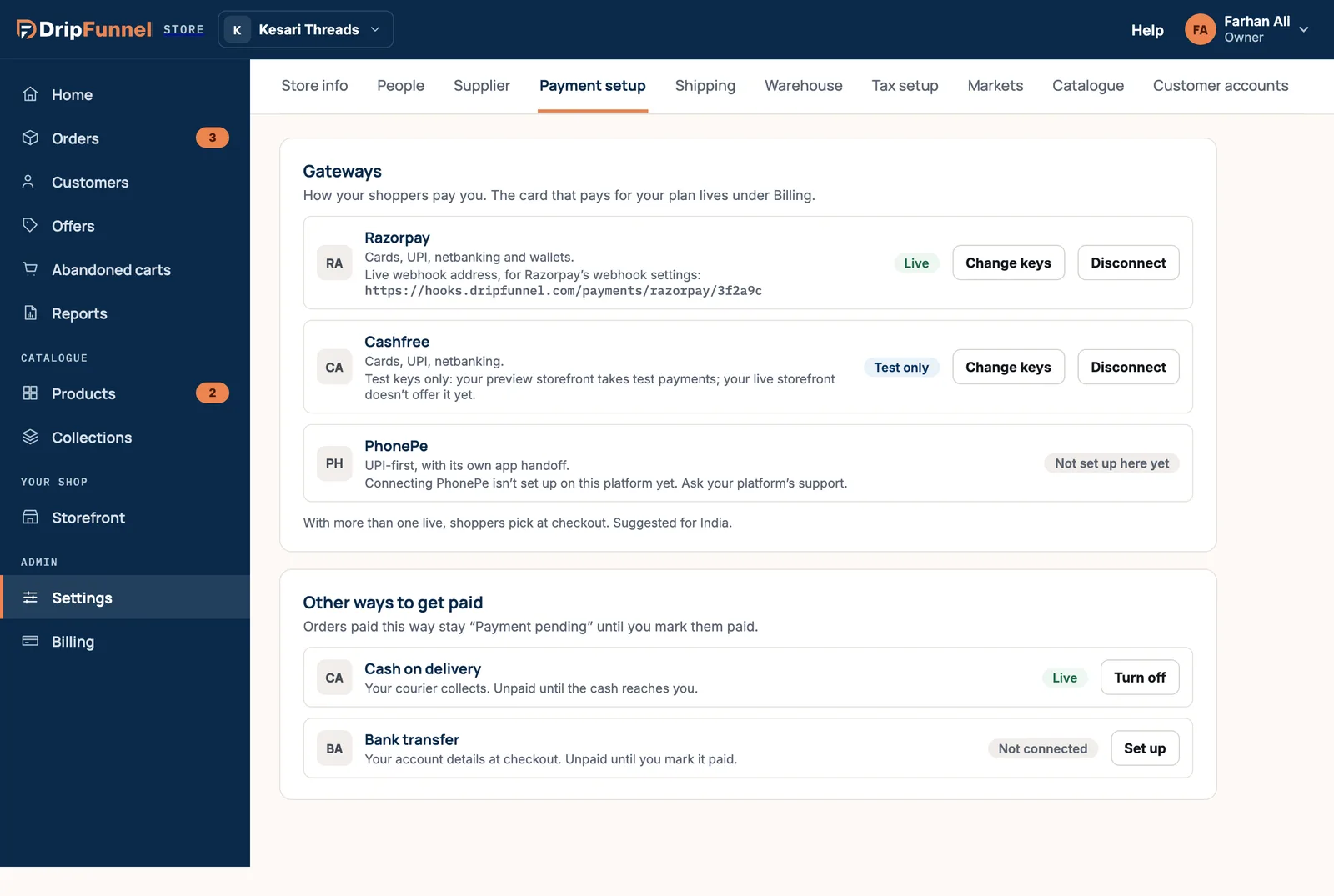
Each provider has a status:
- Live: shoppers can pay with it on your live shop.
- Test only: only test keys are connected, so only your preview takes (test) payments with it.
- Not connected: press Connect to set it up.
- Not set up here yet: this provider isn’t available on the platform yet, so there’s no button. Ask support if you need it.
Connect Stripe (United States)
- Press Connect next to Stripe, then Continue to Stripe.
- Sign in to Stripe (or create an account) and approve the connection.
- Stripe sends you back to the portal. Wait while it says Finishing your Stripe connection….
- You see Stripe connected — shoppers can pay by card now.
If you closed Stripe without approving, you see that nothing changed; press Connect again whenever you’re ready. A Stripe account can only take payments for one store.
Connect Razorpay, Cashfree, PhonePe or PayPal
- Press Connect next to the provider.
- In your provider’s dashboard, find your API keys (usually under Settings or Developers).
- Copy each key into the matching box in the portal. The boxes are named as the provider names them, for example Key id, Key secret and Webhook secret for Razorpay.
- Under Use them for, choose Your live storefront: real payments, or Your preview storefront: test payments if these are test keys.
- Press Connect. The button stays greyed out until every box is filled.
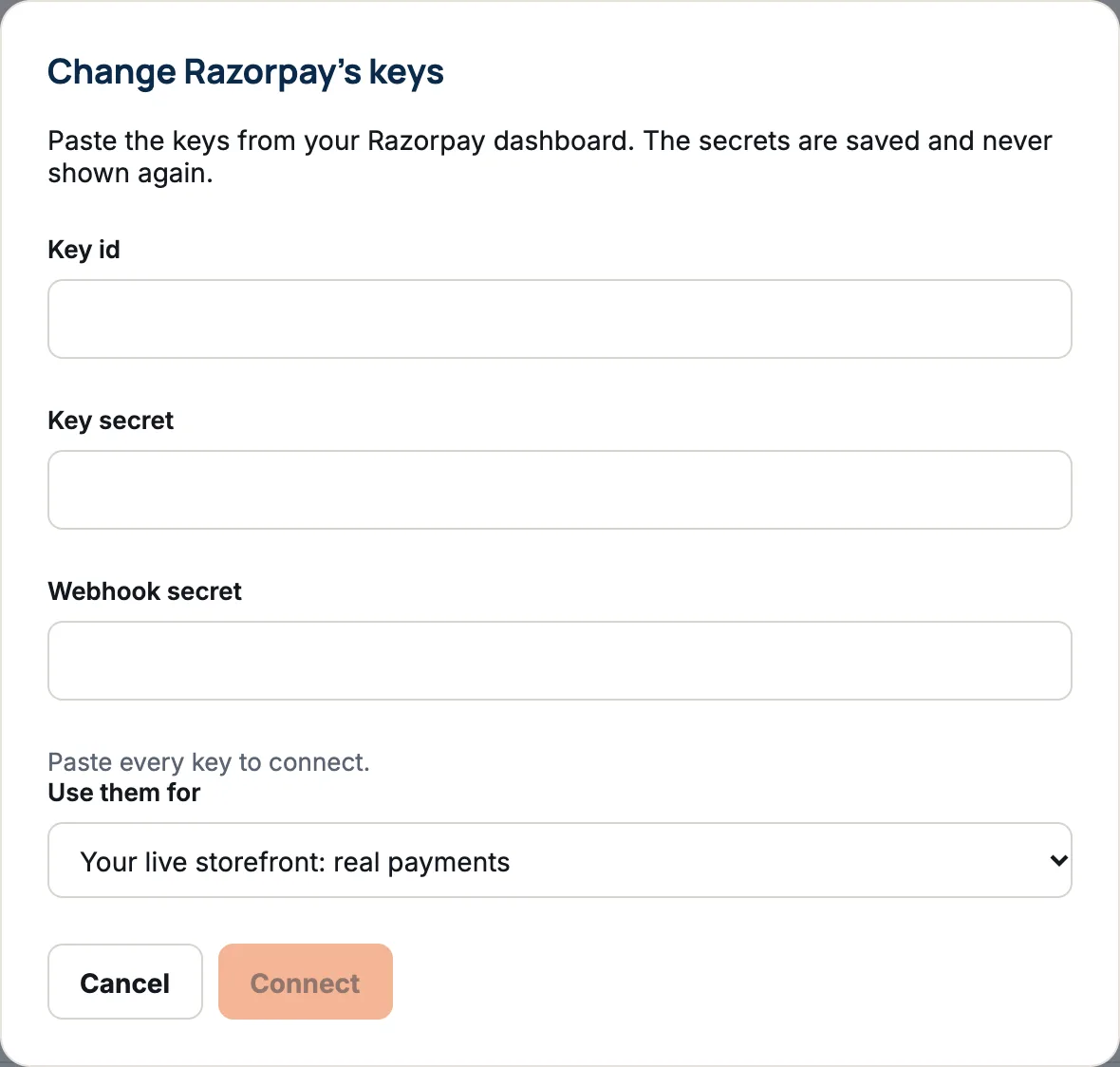
Secret keys are saved safely and never shown again. To replace them later, press Change keys.
The webhook address
A webhook is how the provider tells your shop that a payment went through. Once connected, the provider’s row shows a webhook address. Copy it into the webhook settings in your provider’s dashboard, so orders are marked paid straight away.
Test before you go live
Connect test keys with Your preview storefront: test payments, open your shop’s preview and place an order with the provider’s test card. It shows as a Test order and never ships. When it works, connect your live keys.
More than one provider
You can have several providers live at once. Shoppers then choose at checkout.
Turn a provider off
Press Disconnect and confirm. Shoppers stop seeing it at checkout and its keys are removed; orders already paid aren’t affected. You can’t turn off your only way to get paid: shoppers couldn’t buy anything.
If something goes wrong
| Message | What to do |
|---|---|
| Those keys aren’t in the shape this provider gives them… | A key was copied into the wrong box or cut short. Copy each one again. |
| The provider didn’t accept those keys… | Check you copied live keys for live, test keys for test, from the right account. |
| We couldn’t reach the provider to check those keys. | Try again in a minute. |
| That Stripe account already takes payments for another store. | Connect a different Stripe account. |
| That link has expired. Connect Stripe again. | Press Connect again. |
Questions
Does DripFunnel take a cut of my sales?
No. DripFunnel takes no fee on your orders. Your payment provider charges its own fees.
Is this the card I pay my plan with?
No. These settings are how shoppers pay you. The card that pays for your DripFunnel plan is in Billing.
Can a manager set up payments?
No. Payment setup is for the store owner only.
Can I take cash or bank transfers too?
Yes, where offered: see Offer cash on delivery and Accept bank transfers.