

Set up cart reminder emails
Updated 20 October 2026 · Owners and managersCart reminders are emails that bring shoppers back to a checkout they left. You choose when they go, what they say, and, on some plans, whether they include a discount.
What your plan includes
| Plan | Reminders |
|---|---|
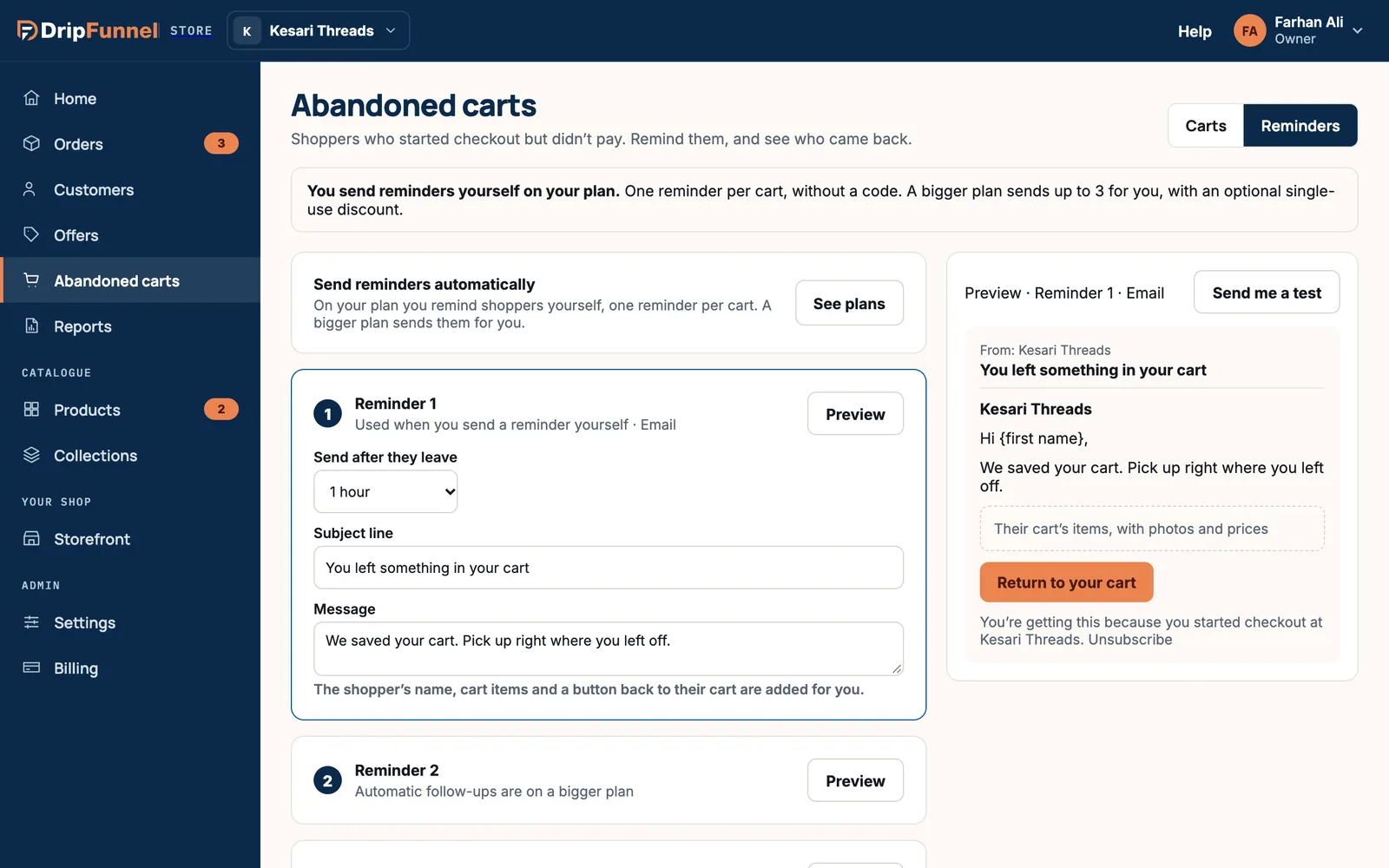
| Starter (Free), Growth | You send them yourself: one reminder per cart, without a discount code |
| Growth Pro, Business, Enterprise | Sent automatically: up to 3 reminders per cart, each with an optional single-use discount |
If you send reminders yourself, you still write the email here; you then press Send reminder now on each cart. See Win back abandoned carts.
Open the reminder settings
Open Abandoned carts and press Reminders at the top right.
Set up each reminder
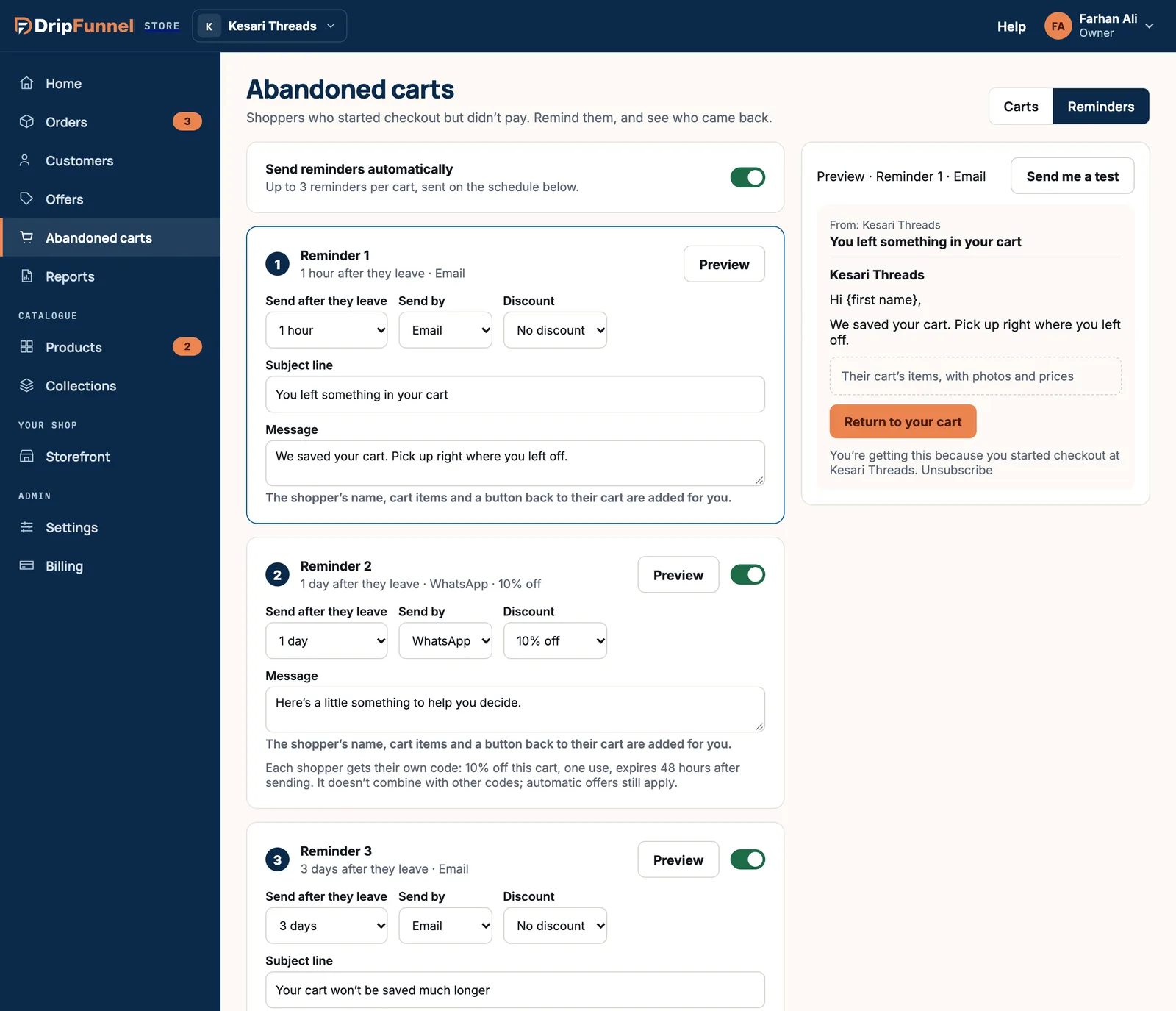
- Switch on Send reminders automatically (if your plan includes it). When it’s off, carts wait for you to remind them.
- For Reminder 1, choose Send after they leave: 30 minutes, 1 hour, 4 hours, 10 hours, 1 day, 2 days or 3 days.
- Choose Send by: Email, or in India WhatsApp.
- Choose a Discount: No discount, or 5%, 10%, 15% or 20% off.
- Write the Subject line (emails only, up to 120 characters) and the Message (up to 500 characters). The shopper’s name, their cart items and a button back to their cart are added for you.
- Switch Reminder 2 and Reminder 3 on or off, and set them up the same way. Each must go later than the one before it.
- Press Save in the bar at the bottom.
With a discount, each shopper gets their own code: that percentage off this cart, usable once, and it expires 48 hours after sending. It doesn’t combine with other codes, but automatic offers still apply.
Choose who gets reminded
- Only carts worth at least an amount: leave it empty to remind every cart.
- Skip carts where everything is out of stock.
- Quiet hours: nothing goes out between 9 pm and 8 am in your store’s time.
- Once a week per shopper: a shopper who leaves several carts gets reminded about one per week.
- Stop as soon as they buy: always on. Nobody gets a reminder after paying.
Privacy rules by country
- Every reminder email has an unsubscribe link.
- For shoppers in the EU, only those who agreed to emails at checkout get reminders.
- In India, WhatsApp reminders only go to signed-in shoppers who agreed to WhatsApp messages; everyone else gets email.
Preview and test
- Press Preview on a reminder to see it on the right, as an email or a WhatsApp message.
- Press Send me a test, then Send test. A test of the saved reminder goes to your own email, with a sample cart and a code that doesn’t work at checkout. Tests don’t count in your results.
Save first: a test always sends the saved version. If it hasn’t arrived within a minute, check your spam folder.
If something goes wrong
- “Must go later than the reminder before it.”: each reminder needs a later send time than the one above it.
- “Someone else saved your reminders.”: press Reload to see their changes, then make yours again.
- “Too many tests.”: wait a minute and try again.
Questions
When I change the timings, what happens to carts already waiting?
Carts waiting for a reminder follow the new timings once you save.
Will a shopper get a reminder after they’ve paid?
No. Reminders always stop as soon as the shopper buys.
Can a reminder discount be combined with another code?
No. A reminder code doesn’t combine with other codes, but automatic offers, like free delivery over a minimum, still apply.
Why can’t I choose WhatsApp?
WhatsApp reminders are only for shops in India, on plans where reminders are sent automatically.